정보약관개인 정보연락처
 
업데이트 중
Docs² | for Microsoft Office

Docs² | for Microsoft Office

출시:2013-12-19
© 2013 - 2018 Docs Squared, LLC. All rights reserved.
Docs² | for Microsoft Office - QR코드
버전 5.0
4+
App Store에서 다운로드 하기
버전 5.0
4+
App Store에서 다운로드 하기
출시:2013-12-19
© 2013 - 2018 Docs Squared, LLC. All rights reserved.

iPhone 스크린샷

스크린샷
스크린샷
스크린샷
스크린샷
스크린샷

iPad 스크린샷

스크린샷
스크린샷
스크린샷
스크린샷
스크린샷

설명

–– SAVE BIG TODAY ON DOCS² | THE SMARTEST BUNDLE FOR MICROSOFT OFFICE! ––
• Start working smarter, online and on the go with the Office apps that you know and love.
• Quickly create Microsoft Word, Excel and PowerPoint documents, or email with Outlook.
• Complete with the best documents, guides and templates for Office.
Get Docs² for everything you need to begin quickly creating Microsoft Office docs! Work smarter with great videos to guide you through the essentials, a convenient document browser to edit online and on the go with your favorite apps, plus free templates to help you create beautiful docs. All together in the smartest bundle for Microsoft Office!
FEATURES
– Explore the essentials of Microsoft Office with helpful videos & content to guide you.
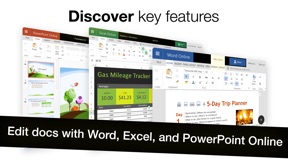
– Create and share docs online with convenient shortcuts for your favorite Office apps, including:
–– Word, Excel, PowerPoint, Outlook, OneNote & OneDrive.
– Discover free templates to create beautiful documents.
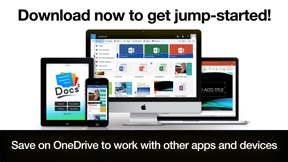
– Save docs offline or in OneDrive to work with other apps and devices.
QUICKLY LEARN TO:
– Create Word, Excel and PowerPoint documents.
– Update your calendar and manage mail with Outlook.
– Edit and add comments to documents.
– Save, print, publish and share documents.
– Add charts, pictures, animations and effects.
– Insert a table of contents, headers, and footers.
– Create and print custom labels and PDFs.
– Work with documents while on the go.
– And so much more...
DEVELOP YOUR SKILLS WITH THE BEST DOCUMENT BROWSER
– Enjoy streamlined steps to work with documents in OneDrive.
– Work with the most popular document types and formats.
– Avoid frustrating file incompatibility, and "View Only" headaches of other apps.
– Secure your files with Face ID, Touch ID, or passcode.
– Type what you want to do, and the new Tell Me feature will show you how!
SAVE YOUR WORK ONLINE FOR USE ACROSS YOUR DEVICES
– Because working without the cloud is so 1999...
– Simply save your files to OneDrive to edit them everywhere.
– Automatically sync documents for use across your devices.
– Easily share your documents with friends and colleagues.
– Enjoy greater freedom with online and mobile editing.
EXPLORE HUNDREDS OF PROFESSIONAL QUALITY TEMPLATES
– Browse a free treasure trove of time saving templates.
– Select the perfect layout or theme, and edit online or save offline.
– Start creating beautiful documents in no time!
LEARN FROM THE MASTERS
– The included guides show you everything you need to be more productive, discover key features, and learn to get things done fast.
Download now to get jump-started!
____________
NOTICE: Microsoft Office 365, Word, Excel, PowerPoint, Outlook, OneNote, and OneDrive are property or trademarks of Microsoft Corporation. Docs² is a property and trademark of Docs Squared, and is neither produced by, endorsed by, nor affiliated with Microsoft Corporation. Access to Microsoft Office functionality and templates is available for free through Microsoft Office Online, or you can work offline with even more features via an Office 365 trial subscription. © 2013-2018 Docs Squared, LLC. All rights reserved.

5.0 버전의 새로운 기능

This app has been updated by Apple to display the Apple Watch app icon.
Great news! Bugs have been squashed and are extremely rare in this version. You'll love the results!
- Over 99.6% of customers don't report experiencing any technical issues.
- In the unlikely event of a problem: Contact us anytime. We’re happy to help!
New Features:
• Designed to feel faster, more fun, and help you get things done!
• Secure access to your files with Face ID, Touch ID, or passcode.
• Support for the new iPhone X and iPad Pro.
Other improvements...
– Added support for business and education, in addition to personal users.
– Streamlined steps for document editing.
– Stability and performance improvements.
– Interface and other enhancements.
– Optimized for iOS 11.
– Content updates.
– Other fixes.

판매자

이름

Docs Squared, LLC

URL

정보

카테고리

버전

5.0

크기

87.1 MB

Game Center

아니요

VPP Device Licensing

선호도

등급:4+

호환성

iOS 9.0 이상

장비

iPhone 4S, iPhone 5, iPhone 5c, iPhone 5s, iPhone 6, iPhone 6 Plus, iPhone 6s, iPhone 6s Plus, iPhone SE, iPhone 7, iPhone 7 Plus, iPhone 8, iPhone 8 Plus, iPhone X, iPhone XR, iPhone XS, iPhone XS Max, iPhone 11, iPhone 11 Pro, iPhone 11 Pro Max, iPhone SE (2nd generation), iPhone 12, iPhone 12 Pro, iPhone 12 Pro Max, iPhone 12 mini, iPhone 13, iPhone 13 Pro, iPhone 13 Pro Max, iPhone 13 mini, iPhone SE(3세대), iPhone 14, iPhone 14 Plus, iPhone 14 Pro, iPhone 14 Pro Max, iPhone 15, iPhone 15 Plus, iPhone 15 Pro, iPhone 15 Pro Max, iPhone 16, iPhone 16 Plus, iPhone 16 Pro, iPhone 16 Pro Max, iPhone 16e, iPad 2(Wi-Fi), iPad 2(3G), 3세대 iPad(Wi-Fi), 3세대 iPad(4G), iPad(4세대, Wi-Fi), iPad(4세대, 4G), iPad(5세대, Wi-Fi), iPad(5세대, Wi-Fi + Cellular), iPad(6세대, Wi-Fi), iPad(6세대, Wi-Fi + Cellular), iPad Pro, iPad Pro(Cellular), iPad Pro(9.7형), iPad Pro(9.7형, Cellular), 12.9형 iPad Pro (2nd generation), 12.9형 iPad Pro (2nd generation) Wi-Fi + Cellular, 10.5형 iPad Pro, 10.5형 iPad Pro Wi-Fi + Cellular, 11형 iPad Pro, 11형 iPad Pro Wi-Fi + Cellular, 12.9형 iPad Pro (3rd generation), 12.9형 iPad Pro (3rd generation) Wi-Fi + Cellular, iPad Air, iPad Air(Cellular), iPad Air 2, iPad Air 2(Cellular), iPad Air(3세대), iPad Air(3세대, Wi-Fi + Cellular), iPad mini(Wi-Fi), iPad mini(4G), iPad mini Retina, iPad mini Retina(Cellular), iPad mini 3, iPad mini 3(Cellular), iPad mini 4, iPad mini 4(Cellular), iPad mini(5세대), iPad mini(5세대, Wi-Fi + Cellular), iPad (7세대, Wi-Fi + Cellular), 11형 iPad Pro (2nd generation), 11형 iPad Pro (2nd generation) Wi-Fi + Cellular, 12.9형 iPad Pro (4th generation), 12.9형 iPad Pro (4th generation) Wi-Fi + Cellular, iPad Air(4세대, Wi-Fi), iPad Air(4세대, Wi-Fi + Cellular), iPad (8세대, Wi-Fi), iPad (8세대, Wi-Fi + Cellular), 11형 iPad Pro (3rd generation), 11형 iPad Pro (3rd generation) Wi-Fi + Cellular, 12.9형 iPad Pro (5세대), 12.9형 iPad Pro (5세대) Wi-Fi + Cellular, iPad(9세대), iPad(9세대, Wi-Fi + Cellular), iPad mini(6세대), iPad mini(6세대, Wi-Fi + Cellular), iPad Air(5세대), iPad Air(5세대) Wi-Fi + Cellular, 11형 iPad Pro (4th generation), 11형 iPad Pro (4th generation) Wi-Fi + Cellular, iPad Pro 12.9(6세대), iPad Pro 12.9(6세대) Wi-Fi + Cellular, iPad(10세대), iPad(10세대) Wi-Fi + Cellular, iPad Air 11(M2 모델) Wi-Fi, iPad Air 13(M2 모델) Wi-Fi, iPad Air 13(M2 모델) Wi-Fi + Cellular, iPad Pro 11(M4 모델) Wi-Fi, iPad Pro 11(M4 모델) Wi-Fi + Cellular, iPad Pro 13(M4 모델) Wi-Fi, iPad Pro 13(M4 모델) Wi-Fi + Cellular, iPad mini (A17 Pro) Wi-Fi, iPad mini (A17 Pro) Wi-Fi + Cellular, iPad(A16) Wi-Fi, iPad(A16) Wi-Fi + Cellular, iPad Air 11(M3) Wi-Fi, iPad Air 11(M3) Wi-Fi + Cellular, iPad Air 13(M3) Wi-Fi, iPad Air 13(M3) Wi-Fi + Cellular, iPod touch(5세대), iPod touch(6세대), iPod touch(7세대)

언어

영어

App Store:고객 평가

평가 및 리뷰

4.4/5 (27 개의 평가)

App Store:리뷰

2019-01-05

환불요청

왜 이렇게 만들었나요?
만드신 분은 이것을 만들고 나서 사용하고 계시나요?
환불요청합니다.
abada107
버전 1.6
2016-01-09

Nothing is possible

I suppose that I can create and edit any docs as it is written.
But it require purchasing additional app.
Keep what you promise!!!
Or, stop advertising or selling this app.
Ss201021
버전 1.23
2014-08-19

내가 원하는 앱이아니어서 구입 철회를 원합니다

이 앱은 오피스 자습서이고 Tutorial 이어서 제가 원하는 앱이 아닙니다
구입하고 싶지 않으니 구입을 철회합니다
구입 금액을 반환해주세요
Request return money
This app is not working that I want
This app is tutorial, not office file.
Please refund money
captain Yoo
버전 3.3
2014-03-28

환불요청

잘못 구매했네요.
davidmin35
버전 1.11
2014-03-15

너무하네요..완전 사기 앱 같아요

10불이나 내고 다운받았더니 추가적인 유료 앱을 깔아야만 MS OFFICE를 사용할 수있게 되어있네요. 이런 앱은 없어져야한다고 봅니다. 유료 오피스앱을 그냥 바로 올리세요, 소비자를 기만하지마시고.
beagle214
버전 1.11
2014-02-12

Plz my money back.

Sorry I didn't know to be the video.
Please my money back.
(동영상인줄 모르고 결제 했어요 환불 부탁드립니다.)
아울적에
버전 1.0
2014-01-02

환불

환불해줘요
Ruciel
버전 1.2
2013-12-30

풀닥샀어요~

지금 쓰고 있습니다만,
어플을 사용할 때 프리젠테이션중에 여러가지 기호들이나 문자들이 깨져서 나오는 경우가 많습니다.
글자가 거의 깨져서 이용하는데 불편함이 다소 있습니다.
그리고 다른 애플 어플리케이션 처럼 오프라인으로도 문서를 저장할 수 없나요?
매번 온라인으로 다운 받아야 하면 데이터 사용량이 엄청 날 것 같아요.. 참고해주세용!!
Dr_Jonathan99
버전 5.0