정보약관개인 정보연락처
 
업데이트 중
SA Group Text

SA Group Text

출시:2010-12-17
© 2012-2020 SamApp
SA Group Text - QR코드
버전 3.3.9
4+
App Store에서 다운로드 하기
버전 3.3.9
4+
App Store에서 다운로드 하기
출시:2010-12-17
© 2012-2020 SamApp

iPhone 스크린샷

스크린샷
스크린샷
스크린샷
스크린샷
스크린샷

iPad 스크린샷

스크린샷
스크린샷
스크린샷
스크린샷
스크린샷

설명

SA Group Text is the most efficient way to send group messages. You can add recipient names and phone numbers in an Excel file. You can enter static or personalized text messages right in the Excel spreadsheet. For example, if you enter “Hi {first name}, ...” in a message, the app will take the first name of the recipients and personalize the message, generating text such as “Hi David, …” , “Hi Michael, …”…
You can use an Excel spreadsheet again without editing the spreadsheet on your computer. You can just pick an Excel file, type in a quick message and send it. It is similar to sending a message to a group.
SA Group Text is also an easy way to send text messages to the contacts on your iPhone. Just pick groups or individual contacts, type in a static or personalized message and send it.
Who uses SA Group Text ?
1) Small Businesses
2) Religious Groups
3) Retail
4) Nightlife - Bars & Nightclubs
5) Restaurants
6) Banks/Financial Institutions
7) Insurance Companies
8) Event Marketers (With hundreds (or even thousands) of people attending your events)
9) Traditional Media
10) Schools
11) Social Groups
12) Real Estate
With SA Group Text you can :
1. Import group SMS from an Excel file via USB/WiFi/Email.
2. Create your own groups in an Excel spreadsheet and send messages to them.
3. Send unsent messages . If the app is terminated while sending group SMS, the sending task will be continued next time you launch the app..
4. Insert tags ({nickname},{firstname},{lastname},{nickname},{company} etc) in your text message in order to create personalized messages. When you use this function, each message has a personal touch. For example:
Dear {firstname}, Welcome to our dinner party.
5. Use MS Excel 2003 / 2007 / 2010 , OpenOffice.org , Apple Numbers or any other Excel-compatible applications to create your group text messages. Be sure to save as an Excel 97-2003 Workbook.
6. Export an Excel template , and use it to create your own Excel file.
7. Send SMS to as many recipients as you need within your Excel file
8. Limit the number of recipients per message. The app will split a large message into multiple separate messages.
9. Create a formatted Excel file easily. The file can contain only two columns : Mobile and Message. You can find more example spreadsheets on the app’s website.
10. Create flexible group SMS in your spreadsheet.
For example “{family} Family – Practice Tomorrow at 5pm for little {kidname}!” becomes “David Family – Practice Tomorrow at 5pm for little Johnny!”. The names change over and over again.
11. Create contact groups, you can create in-app groups for Exchange contacts.
12. Choose contacts organized in groups, companies, job titles and cities.
13. Preview messages before sending them out.
14. Skip duplicated phone numbers and messages.
15. The lite version has ads.
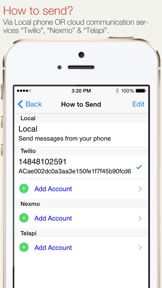
16. Send online sms, supporting Twilio, TelApi and Nexmo.
17. Find a way to send messages without user interaction, please contact to samyuservice@gmail.com for details.
IMPORTANT NOTE :
Please check the setting of "Group Messaging" on the iPhone settings. If the option is available, set it to OFF (yes OFF) to be able to send to large groups. If it's on, the iPhone will try to send MMS instead of SMS and will fail to send to large groups.
More detail and up-to-date help guides are available in samapp.com.

3.3.9 버전의 새로운 기능

1. Fixed a crash bug

판매자

이름

ShenZhen SamApp Technology Development Co., Ltd

정보

카테고리

버전

3.3.9

크기

6.1 MB

Game Center

아니요

VPP Device Licensing

선호도

등급:4+

호환성

iOS 8.0 이상

장비

iPhone 4S, iPhone 5, iPhone 5c, iPhone 5s, iPhone 6, iPhone 6 Plus, iPhone 6s, iPhone 6s Plus, iPhone SE, iPhone 7, iPhone 7 Plus, iPhone 8, iPhone 8 Plus, iPhone X, iPhone XR, iPhone XS, iPhone XS Max, iPhone 11, iPhone 11 Pro, iPhone 11 Pro Max, iPhone SE (2nd generation), iPhone 12, iPhone 12 Pro, iPhone 12 Pro Max, iPhone 12 mini, iPhone 13, iPhone 13 Pro, iPhone 13 Pro Max, iPhone 13 mini, iPhone SEThirdGen, iPad 2(Wi-Fi), iPad 2(3G), 3세대 iPad(Wi-Fi), 3세대 iPad(4G), iPad(4세대, Wi-Fi), iPad(4세대, 4G), iPad(5세대, Wi-Fi), iPad(5세대, Wi-Fi + Cellular), iPad(6세대, Wi-Fi), iPad(6세대, Wi-Fi + Cellular), iPad Pro, iPad Pro(Cellular), iPad Pro(9.7형), iPad Pro(9.7형, Cellular), 12.9형 iPad Pro (2nd generation), 12.9형 iPad Pro (2nd generation) Wi-Fi + Cellular, 10.5형 iPad Pro, 10.5형 iPad Pro Wi-Fi + Cellular, 11형 iPad Pro, 11형 iPad Pro Wi-Fi + Cellular, 12.9형 iPad Pro (3rd generation), 12.9형 iPad Pro (3rd generation) Wi-Fi + Cellular, iPad Air, iPad Air(Cellular), iPad Air 2, iPad Air 2(Cellular), iPad Air(3세대), iPad Air(3세대, Wi-Fi + Cellular), iPad mini(Wi-Fi), iPad mini(4G), iPad mini Retina, iPad mini Retina(Cellular), iPad mini 3, iPad mini 3(Cellular), iPad mini 4, iPad mini 4(Cellular), iPad mini(5세대), iPad mini(5세대, Wi-Fi + Cellular), iPad (7세대, Wi-Fi + Cellular), 11형 iPad Pro (2nd generation), 11형 iPad Pro (2nd generation) Wi-Fi + Cellular, 12.9형 iPad Pro (4th generation), 12.9형 iPad Pro (4th generation) Wi-Fi + Cellular, iPad Air(4세대, Wi-Fi), iPad Air(4세대, Wi-Fi + Cellular), iPad (8세대, Wi-Fi), iPad (8세대, Wi-Fi + Cellular), 11형 iPad Pro (3rd generation), 11형 iPad Pro (3rd generation) Wi-Fi + Cellular, 12.9형 iPad Pro (5세대), 12.9형 iPad Pro (5세대) Wi-Fi + Cellular, iPad(9세대), iPad(9세대, Wi-Fi + Cellular), iPad mini(6세대), iPad mini(6세대, Wi-Fi + Cellular), iPad AirFifthGen, iPad AirFifthGenCellular, iPod touch(5세대), iPod touch(6세대), iPod touch(7세대), Apple Watch Series 4, Apple Watch Series 5, Apple Watch Series 6 (GPS), Apple Watch Series 6 (GPS + Cellular), Apple Watch Series SE (GPS), Apple Watch Series SE (GPS + Cellular), Apple Watch Series 7 (GPS), Apple Watch Series 7 (GPS + Cellular)

언어

독일어, 러시아어, 스페인어, 영어, 일본어, 중국어

App Store:고객 평가

평가 및 리뷰

4.0/5 (2 개의 평가)

App Store:리뷰

2020-03-27

ios 13.4 app down! app do not work!

ios 13.4 sa group text, diwn! app do nor properly work!
김경진진
버전 3.3.7