정보약관개인 정보연락처
 
업데이트 중
eProjector

eProjector

출시:2010-06-30
© 2010 - 2020 Microtech Corp.
eProjector - QR코드
버전 2.1.0
4+
App Store에서 다운로드 하기
버전 2.1.0
4+
App Store에서 다운로드 하기
출시:2010-06-30
© 2010 - 2020 Microtech Corp.

iPhone 스크린샷

스크린샷
스크린샷
스크린샷
스크린샷

iPad 스크린샷

스크린샷

설명

eProjector for stylish presentation
eProjector is stylish Presentation Application.
It handles with PDF documents.
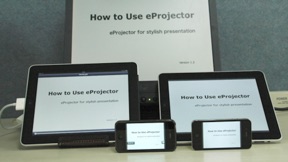
The presenter uses iPhone/iPad as a remote controller and controls the audience’s documents on the iPhone/iPad.
You can make smarter and more impressive presentation.
The audience will not bother the presenter's hands turning pages anymore.
The presenter can view the slides in ones hands while going on the presentation.
If you connect iPhone/iPad to projector, you will give a presentation for a lot of people. And you control the slides from your iPhone/iPad.
Laser pointer function supports you to tell thinking smoothly.
eProjector helps you to succeed in important presentation.
[Functions]
1. Remote controlled from iPhone/iPad (Now available to connect multiple devices as audience)
Page Forward, Page Back or Page Jump using Slider
2. PDF file documents display function
3. PDF file documents transfer function
4. PDF file documents import function
iDisk/ WebDAV
Document sharing from iTunes
Import from email attached file
5. Laser pointer function
6. Timer display function
7. Maker function
8. Mirroring while connecting VGA
[Requirements]
Bluetooth is necessary to use remote control.
An adapter is required to connect iPad or iPhone
to the projector.
[NOTES]
Only PDF file is available.
You can use iPhone or iPad as Presenter or Audience.
You can’t save drawings written by maker.
Produced by e-Workshop

2.1.0 버전의 새로운 기능

Fixed bugs.

판매자

정보

카테고리

버전

2.1.0

크기

20.9 MB

Game Center

아니요

VPP Device Licensing

선호도

등급:4+

호환성

iOS 9.0 이상

장비

iPhone 4S, iPhone 5, iPhone 5c, iPhone 5s, iPhone 6, iPhone 6 Plus, iPhone 6s, iPhone 6s Plus, iPhone SE, iPhone 7, iPhone 7 Plus, iPhone 8, iPhone 8 Plus, iPhone X, iPhone XR, iPhone XS, iPhone XS Max, iPhone 11, iPhone 11 Pro, iPhone 11 Pro Max, iPhone SE (2nd generation), iPhone 12, iPhone 12 Pro, iPhone 12 Pro Max, iPhone 12 mini, iPad 2(Wi-Fi), iPad 2(3G), 3세대 iPad(Wi-Fi), 3세대 iPad(4G), iPad(4세대, Wi-Fi), iPad(4세대, 4G), iPad(5세대, Wi-Fi), iPad(5세대, Wi-Fi + Cellular), iPad(6세대, Wi-Fi), iPad(6세대, Wi-Fi + Cellular), iPad Pro, iPad Pro(Cellular), iPad Pro(9.7형), iPad Pro(9.7형, Cellular), 12.9형 iPad Pro (2nd generation), 12.9형 iPad Pro (2nd generation) Wi-Fi + Cellular, 10.5형 iPad Pro, 10.5형 iPad Pro Wi-Fi + Cellular, 11형 iPad Pro, 11형 iPad Pro Wi-Fi + Cellular, 12.9형 iPad Pro (3rd generation), 12.9형 iPad Pro (3rd generation) Wi-Fi + Cellular, iPad Air, iPad Air(Cellular), iPad Air 2, iPad Air 2(Cellular), iPad Air(3세대), iPad Air(3세대, Wi-Fi + Cellular), iPad mini(Wi-Fi), iPad mini(4G), iPad mini Retina, iPad mini Retina(Cellular), iPad mini 3, iPad mini 3(Cellular), iPad mini 4, iPad mini 4(Cellular), iPad mini(5세대), iPad mini(5세대, Wi-Fi + Cellular), iPad (7세대, Wi-Fi + Cellular), 11형 iPad Pro (2nd generation), 11형 iPad Pro (2nd generation) Wi-Fi + Cellular, 12.9형 iPad Pro (4th generation), 12.9형 iPad Pro (4th generation) Wi-Fi + Cellular, iPad Air(4세대, Wi-Fi), iPad Air(4세대, Wi-Fi + Cellular), iPad (8세대, Wi-Fi), iPad (8세대, Wi-Fi + Cellular), 11형 iPad Pro (3rd generation), 11형 iPad Pro (3rd generation) Wi-Fi + Cellular, 12.9형 iPad Pro (5세대), 12.9형 iPad Pro (5세대) Wi-Fi + Cellular, iPod touch(5세대), iPod touch(6세대), iPod touch(7세대), Apple Watch Series 4, Apple Watch Series 5, Apple Watch Series 6 (GPS), Apple Watch Series 6 (GPS + Cellular), Apple Watch Series SE (GPS), Apple Watch Series SE (GPS + Cellular)
언어

영어, 일본어

App Store:고객 평가

평가 및 리뷰

4.5/5 (2 개의 평가)

App Store:리뷰

2012-04-28

laser point is not correct.

iphone is presenter
laser point is up from touch point
I want 2mode
exactly point and above point
내면의 소리 듣기
버전 1.4