업데이트 중


iPhone 스크린샷
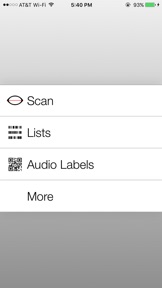
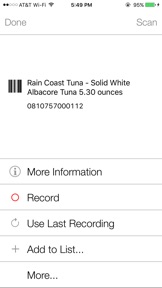


설명
Best. Barcode. Reader. Ever! Scan UPC / EAN codes and hear the names of over 37 million products! Make your own QR code labels on the Digit-Eyes website and print them on inexpensive address labels. These barcoded labels may contain text that VoiceOver reads aloud or they can be used to record audio on your iPhone or iPad that is played back whenever the bar code is scanned.
Blind? Dyslexic? Having problems reading? Digit-Eyes is for you! With Digit-Eyes, you can
- Record your own labels. Visit the Digit-Eyes web site to print specially coded quick-response (QR) digital code labels, apply one to your calendar or a box of leftovers, scan, and record a message. To listen to the recording, just rescan the label. This is how Nancy keeps track of her appointments; how Jeanette labels her canning and how Randy keeps the fridge clean.
- Make text-based labels. Visit the Digit-Eyes web site to type up to 250 characters per label, print the specially coded quick-response (QR) barcodes on address labels on your local printer and apply them to your file folders or CDs. To listen to the text, scan it with the Digit-Eyes application on any iPhone or iPad. This is how Will’s secretary labels his folders and how Ana snoops through her friends’ CD collection.
- Buy pre-printed washable labels. Sew them into your clothing and record whatever you want to about the garment: color, fabric care or what it should be worn with. Even when the labels have been washed, bleached, sent through the dryer or dry-cleaned, you’ll still be able to scan them with the Digit-Eyes app on your iPhone or iPad and hear what you recorded about the garment. This is how Davey makes sure he is wearing matching clothing and how Elizabeth can easily sort the laundry.
- Use the manufacturer's product code to find out what the item is. Digit-Eyes includes a feature that enables you to identify many groceries, CDs, and other consumer goods by scanning the UPC and EAN codes on the products. Just point the camera of your iPhone, Pad or iPod Touch 5g at a package label, scan the code, and wait for Digit-Eyes to call our database and tell you what the item is. This is how Deborah picks out her yarn, how Kevin finds the beef stew, and how both get ready to record their audio labels.
- Read standard inventory tags in code 39 or code 128 format. This is how Michael knows which printer is which at work and how Ben does the shelf stocking in his store.
- Print labels directly from your iPhone on your Bluetooth-connected printer;
- Create and read QR vCard format business card information and add the content to your contacts. This is how Digital Miracles gets information from customers at conferences and how we share our own contact information;
- Create lists of code that you've scanned; edit them, type additional information and share them with others. This is how Robbie notes what items are getting used up and tells Gary what to buy at the store;
- Use Digit-Eyes with any blue-tooth connected laser scanner, integrated as a single unit. This is how John is able to work at a grocery store reading the shelf tags to find where to stock the product.
Use of the free Digit-Eyes website comes with the product. The website contains extensive tutorial material designed for users of the iPhone and iPad who are not sighted. The product purchase also includes free online support and tutoring.
Digit-Eyes is available in English, Danish, French, German, Italian, Polish, Portuguese, Norwegian, Spanish and Swedish.
Digit-Eyes
www.Digit-Eyes.com
The solution is in your hands.
2.3 버전의 새로운 기능
This app has been updated by Apple to use the latest Apple signing certificate.
Support for iOS 10
판매자
이름
Digital Miracles, L.L.C.
정보
카테고리
버전
2.3
크기
3 MB
Game Center
아니요
VPP Device Licensing
예
선호도
등급:4+
호환성
iOS 6.1 이상
장비
iPhone 3GS, iPhone 4, iPhone 4S, iPhone 5, iPhone 5c, iPhone 5s, iPhone 6, iPhone 6 Plus, iPhone 6s, iPhone 6s Plus, iPhone SE, iPhone 7, iPhone 7 Plus, iPhone 8, iPhone 8 Plus, iPhone X, iPhone XR, iPhone XS, iPhone XS Max, iPhone 11, iPhone 11 Pro, iPhone 11 Pro Max, iPhone SE (2nd generation), iPhone 12, iPhone 12 Pro, iPhone 12 Pro Max, iPhone 12 mini, iPad 2(Wi-Fi), iPad 2(3G), 3세대 iPad(Wi-Fi), 3세대 iPad(4G), iPad(4세대, Wi-Fi), iPad(4세대, 4G), iPad(5세대, Wi-Fi), iPad(5세대, Wi-Fi + Cellular), iPad(6세대, Wi-Fi), iPad(6세대, Wi-Fi + Cellular), iPad Pro, iPad Pro(Cellular), iPad Pro(9.7형), iPad Pro(9.7형, Cellular), 12.9형 iPad Pro (2nd generation), 12.9형 iPad Pro (2nd generation) Wi-Fi + Cellular, 10.5형 iPad Pro, 10.5형 iPad Pro Wi-Fi + Cellular, 11형 iPad Pro, 11형 iPad Pro Wi-Fi + Cellular, 12.9형 iPad Pro (3rd generation), 12.9형 iPad Pro (3rd generation) Wi-Fi + Cellular, iPad Air, iPad Air(Cellular), iPad Air 2, iPad Air 2(Cellular), iPad Air(3세대), iPad Air(3세대, Wi-Fi + Cellular), iPad mini(Wi-Fi), iPad mini(4G), iPad mini Retina, iPad mini Retina(Cellular), iPad mini 3, iPad mini 3(Cellular), iPad mini 4, iPad mini 4(Cellular), iPad mini(5세대), iPad mini(5세대, Wi-Fi + Cellular), iPad (7세대, Wi-Fi + Cellular), 11형 iPad Pro (2nd generation), 11형 iPad Pro (2nd generation) Wi-Fi + Cellular, 12.9형 iPad Pro (4th generation), 12.9형 iPad Pro (4th generation) Wi-Fi + Cellular, iPad Air(4세대, Wi-Fi), iPad Air(4세대, Wi-Fi + Cellular), iPad (8세대, Wi-Fi), iPad (8세대, Wi-Fi + Cellular), 11형 iPad Pro (3rd generation), 11형 iPad Pro (3rd generation) Wi-Fi + Cellular, 12.9형 iPad Pro (5세대), 12.9형 iPad Pro (5세대) Wi-Fi + Cellular, iPod touch(4세대), iPod touch(5세대), iPod touch(6세대), iPod touch(7세대)
언어
노르웨이어(보크말), 덴마크어, 독일어, 스웨덴어, 스페인어, 영어, 이탈리아어, 포르투갈어, 폴란드어, 프랑스어
App Store:고객 평가
평가 및 리뷰
0.0/5 (평가 없음)
App Store:리뷰
등록이 안되었습니다.